Campaign 9: Secure the Signal
The Complete Communication Security and Off-Grid Networking Guide
A Sovereignty Module of the Practitioner Community
Preamble
Every system of control depends on controlling communication. If the Archons can monitor what you say, to whom you say it, and when you say it, they can predict and preempt every action you take. Conversely, if you can communicate securely and independently of centralized infrastructure, you become operationally sovereign. This campaign covers digital security, encrypted communication, off-grid radio networks, mesh networking, and the ancient art of secure message passing. Every protocol is immediately executable.
The average person's digital life is an open book. Their phone tracks their location 24/7. Their messages are stored on corporate servers. Their search history profiles their thoughts. Their email is scanned by algorithms. This is not paranoia. This is the documented business model of every major technology company. This campaign teaches you to close that book.
Part I: Digital Security (The Immediate Actions)
Chapter 1: The Digital Audit (Know Your Exposure)
Before you can secure your communications, you must understand what is currently exposed.
The 30-Minute Digital Audit:
| Check | How | What You Will Find |
|---|---|---|
| Google activity | myactivity.google.com | Every search, every location, every voice command, every YouTube video |
| Facebook data | Settings, Your Information, Download Your Information | Every message, every photo, every login location, every ad click |
| Data broker exposure | Search your name on Spokeo, WhitePages, BeenVerified | Your address, phone, relatives, estimated income, political affiliation |
| Password breaches | haveibeenpwned.com | Which of your accounts have been compromised in data breaches |
| Phone permissions | Settings, Apps, Permissions | Which apps access your camera, microphone, location, contacts |
Immediate Actions (Do These Today):
- Enable two-factor authentication on every account that supports it (use an authenticator app, not SMS)
- Use a unique password for every account (use a password manager: Bitwarden is free and open-source)
- Review and revoke unnecessary app permissions on your phone
- Opt out of data brokers (each site has an opt-out process, search "[site name] opt out")
- Delete accounts you no longer use
Chapter 2: Encrypted Messaging
Not all "encrypted" messaging is equal. The critical distinction is between encryption in transit (the message is encrypted while traveling but the company can read it on their servers) and end-to-end encryption (only the sender and recipient can read the message, the company cannot).
Messaging App Comparison:
| App | End-to-End Encrypted | Open Source | Metadata Collection | Recommended |
|---|---|---|---|---|
| Signal | Yes (always) | Yes | Minimal (only phone number and last connection date) | YES, primary recommendation |
| Yes (default) | No (owned by Meta) | Extensive (contacts, groups, frequency, location) | Acceptable for casual use only | |
| Telegram | Only in "Secret Chats" | Partially | Extensive | NO for sensitive communication |
| iMessage | Yes (Apple to Apple) | No | Moderate | Acceptable within Apple ecosystem |
| SMS/MMS | No | N/A | Complete (carrier stores all messages) | NEVER for sensitive communication |
| Facebook Messenger | Optional (not default) | No | Extensive | NO |
| Email (standard) | No | Varies | Complete (provider stores all emails) | NEVER for sensitive communication |
Signal Setup Protocol:
- Install Signal from your device's app store
- Register with your phone number (this is the only metadata Signal stores)
- Set a PIN (this encrypts your Signal profile)
- Enable "Registration Lock" (prevents someone from re-registering your number)
- Set disappearing messages as default (1 week is a good balance)
- Verify safety numbers with your contacts in person (this confirms no man-in-the-middle attack)
Chapter 3: Secure Email
Standard email is a postcard. Anyone handling it can read it. Encrypted email is a sealed letter that only the recipient can open.
Recommended Encrypted Email Providers:
| Provider | Encryption | Jurisdiction | Free Tier | Notes |
|---|---|---|---|---|
| ProtonMail | End-to-end | Switzerland | Yes (500MB) | Best overall, easiest to use |
| Tutanota | End-to-end | Germany | Yes (1GB) | Good alternative, slightly less polished |
| Gmail/Outlook | In transit only | United States | Yes | NOT recommended for sensitive communication |
Email Security Practices:
- Use ProtonMail or Tutanota for sensitive correspondence
- Use PGP encryption for email with non-ProtonMail recipients (ProtonMail makes this easy)
- Never click links in unexpected emails (phishing is the number one attack vector)
- Verify sender addresses carefully (attackers use lookalike domains)
- Use email aliases for different purposes (ProtonMail supports this)
Chapter 4: VPN and Browser Security
Your internet service provider (ISP) can see every website you visit. A VPN (Virtual Private Network) encrypts your internet traffic so your ISP sees only that you are connected to the VPN, not what you are doing.
VPN Selection Criteria:
| Criteria | Why It Matters |
|---|---|
| No-logs policy (audited) | The VPN provider should not store records of your activity |
| Jurisdiction | Avoid Five Eyes countries (US, UK, Canada, Australia, New Zealand) if possible |
| Open-source client | Allows independent verification of security claims |
| Kill switch | Blocks internet if VPN connection drops, preventing accidental exposure |
| Payment options | Ability to pay with cryptocurrency or cash for anonymity |
Recommended VPNs:
- Mullvad (Sweden, accepts cash payment by mail, no email required to sign up)
- ProtonVPN (Switzerland, free tier available, same company as ProtonMail)
- IVPN (Gibraltar, strong privacy focus)
Browser Security:
- Use Firefox with privacy extensions, or use Brave browser (built-in ad/tracker blocking)
- Install uBlock Origin (ad and tracker blocker)
- Use a private search engine: DuckDuckGo, Startpage, or Brave Search
- Clear cookies regularly or use containers (Firefox Multi-Account Containers)
- Disable JavaScript on sites you do not trust (NoScript extension)
Chapter 5: Phone Security
Your phone is the most powerful surveillance device ever created, and you carry it voluntarily.
Essential Phone Security Steps:
| Action | Why | How |
|---|---|---|
| Use a strong passcode (6+ digits) | Prevents physical access | Settings, Security |
| Disable biometrics for unlock | You can be compelled to use your face/finger, not to reveal a passcode | Settings, Security |
| Enable full-disk encryption | Protects data if phone is seized | Default on modern iOS/Android |
| Disable location services for most apps | Prevents location tracking | Settings, Privacy, Location |
| Turn off Wi-Fi and Bluetooth when not in use | Prevents tracking via wireless signals | Quick settings |
| Review app permissions monthly | Apps request more access over time | Settings, Apps, Permissions |
| Use a privacy-focused DNS | Prevents DNS-based tracking | Set DNS to 1.1.1.1 (Cloudflare) or 9.9.9.9 (Quad9) |
| Keep OS and apps updated | Security patches close known vulnerabilities | Settings, Software Update |
The Nuclear Option: GrapheneOS For maximum phone security, install GrapheneOS on a Google Pixel device. GrapheneOS is an open-source, privacy-focused Android operating system that removes all Google services while maintaining full functionality. It is the most secure mobile operating system available to civilians.
Part II: Off-Grid Communication
Chapter 6: Radio Communication Basics
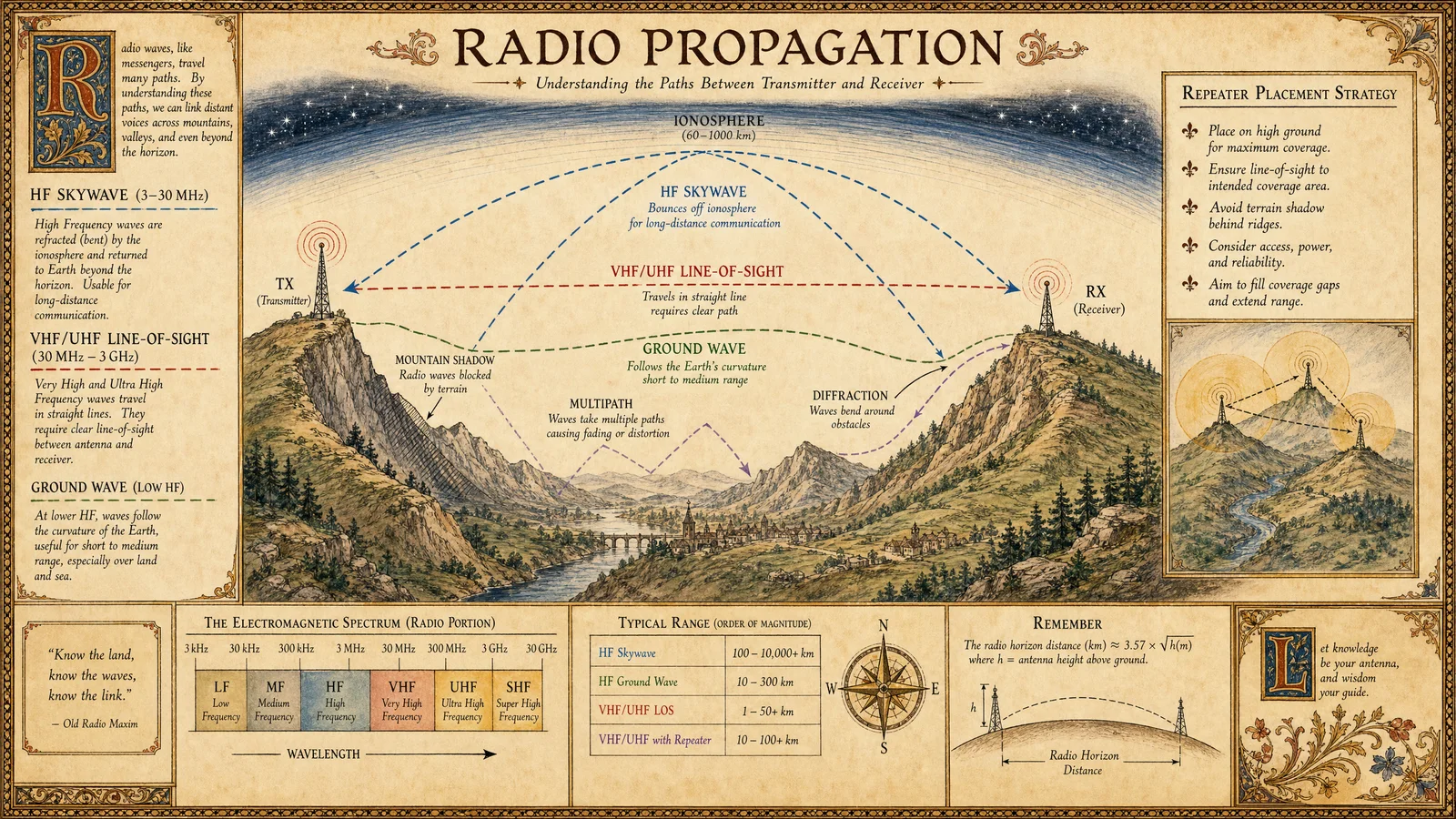
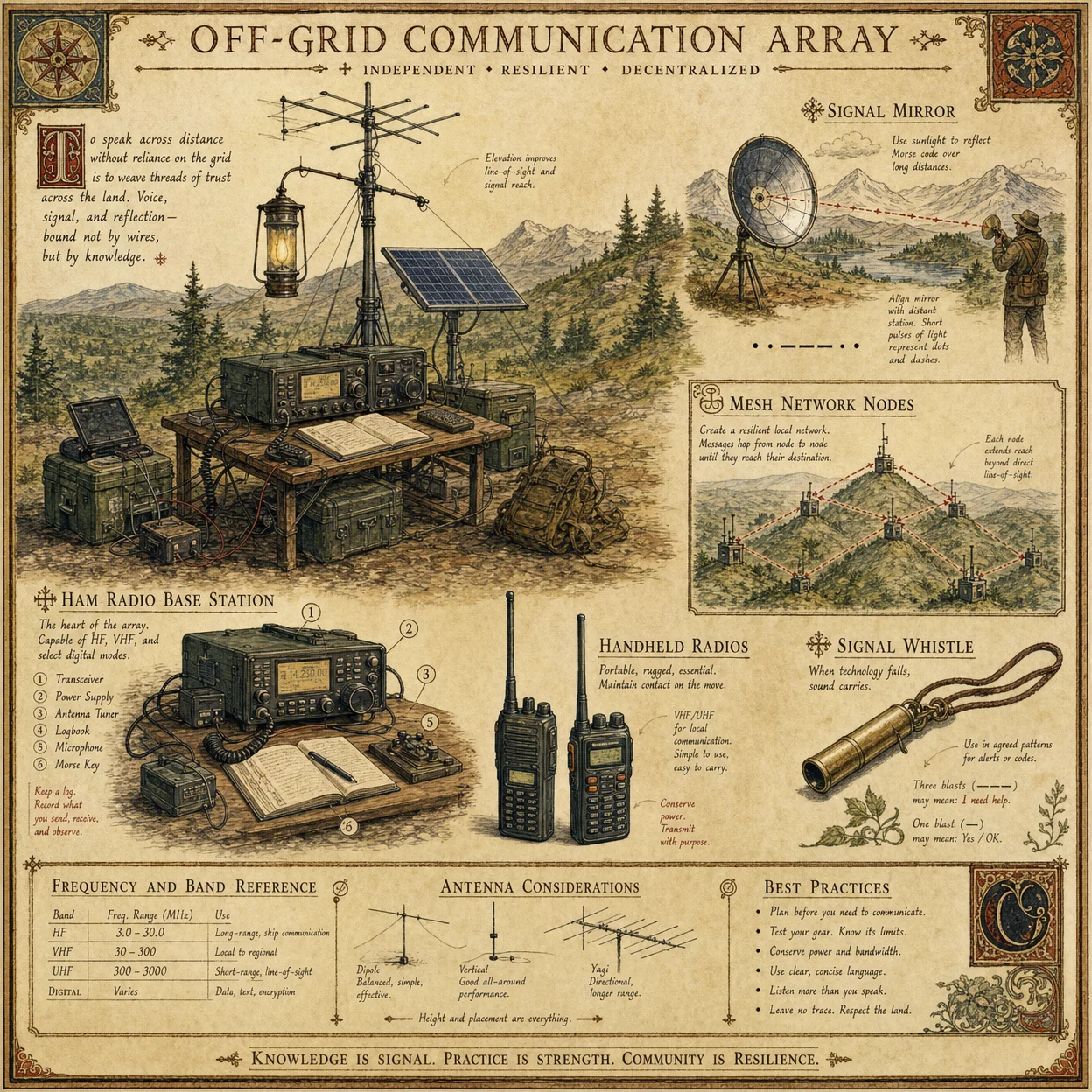
When the internet goes down, when cell towers fail, when the grid collapses, radio still works. Radio waves travel through air at the speed of light and require no infrastructure beyond a transmitter and receiver.
Radio Spectrum Overview:
| Band | Frequency | Range | License Required | Best For |
|---|---|---|---|---|
| FRS (Family Radio Service) | 462-467 MHz | 1-2 miles | No | Short-range family/group communication |
| GMRS (General Mobile Radio Service) | 462-467 MHz | 5-25 miles (with repeaters) | Yes ($35 for 10 years, no exam) | Medium-range community communication |
| Ham (Amateur Radio) | Multiple bands | Local to worldwide | Yes (exam required) | Long-range, emergency, and mesh networking |
| CB (Citizens Band) | 27 MHz | 3-10 miles | No | Vehicle-to-vehicle, trucking |
| MURS (Multi-Use Radio Service) | 151-154 MHz | 1-5 miles | No | Business, farm, property communication |
The Practitioner Radio Kit (Recommended Starting Setup):
| Item | Purpose | Cost |
|---|---|---|
| Baofeng UV-5R (or UV-82) | Dual-band handheld radio (VHF/UHF) | $25-35 |
| Nagoya NA-771 antenna | Upgraded antenna (doubles range) | $10-15 |
| Programming cable + CHIRP software | Program frequencies and channels | $10 |
| FRS/GMRS radio pair (Midland or Motorola) | No-license family communication | $30-50 |
| 12V battery + solar panel (small) | Off-grid power for radios | $50-100 |
| Total | ~$125-200 |
Chapter 7: Ham Radio Licensing and Operation
Amateur (Ham) radio is the most powerful communication tool available to civilians. With the right equipment and license, you can communicate across continents without any infrastructure.
License Levels:
| Level | Exam | Privileges | Study Time |
|---|---|---|---|
| Technician | 35 questions, multiple choice | VHF/UHF (local/regional), some HF | 1-2 weeks |
| General | 35 questions, multiple choice | Most HF bands (worldwide) | 2-4 weeks |
| Amateur Extra | 50 questions, multiple choice | All amateur bands and modes | 4-8 weeks |
How to Get Licensed:
- Study using free resources: hamstudy.org (practice exams), ARRL handbook
- Find a local exam session: arrl.org/find-an-amateur-radio-exam-session
- Take the exam ($15 fee). The Technician exam is achievable with 1-2 weeks of study.
- Receive your callsign from the FCC within 1-2 weeks
- Begin operating
Emergency Communication Protocols:
- ARES (Amateur Radio Emergency Service): Volunteer organization that provides communication during disasters
- RACES (Radio Amateur Civil Emergency Service): Government-affiliated emergency communication
- Winlink: Email over radio (send and receive email without internet using ham radio)
- JS8Call: Keyboard-to-keyboard weak signal communication (works when voice cannot)
- APRS: Automatic Packet Reporting System (position tracking, messaging, weather)
Chapter 8: Mesh Networking
A mesh network is a decentralized communication network where each device (node) connects to nearby nodes, and messages hop from node to node until they reach their destination. No central server. No internet required. No single point of failure.
Meshtastic (Recommended Platform): Meshtastic is an open-source project that turns inexpensive LoRa radio modules into a mesh network. Each node costs $25-50 and can communicate over 1-10 miles (line of sight). Messages hop through the network, extending range with each node.
Setting Up a Meshtastic Network:
- Purchase LoRa devices (Heltec V3 or LilyGo T-Beam are recommended, $25-35 each)
- Flash Meshtastic firmware (meshtastic.org provides instructions)
- Download the Meshtastic app on your phone (connects via Bluetooth)
- Configure your node (set region, channel, and encryption key)
- Distribute nodes to your network members
- Messages are encrypted and hop through all nodes in range
Network Design for a Community:
| Node Type | Location | Purpose |
|---|---|---|
| Base nodes | Homes of network members | Always-on, solar-powered, provide network backbone |
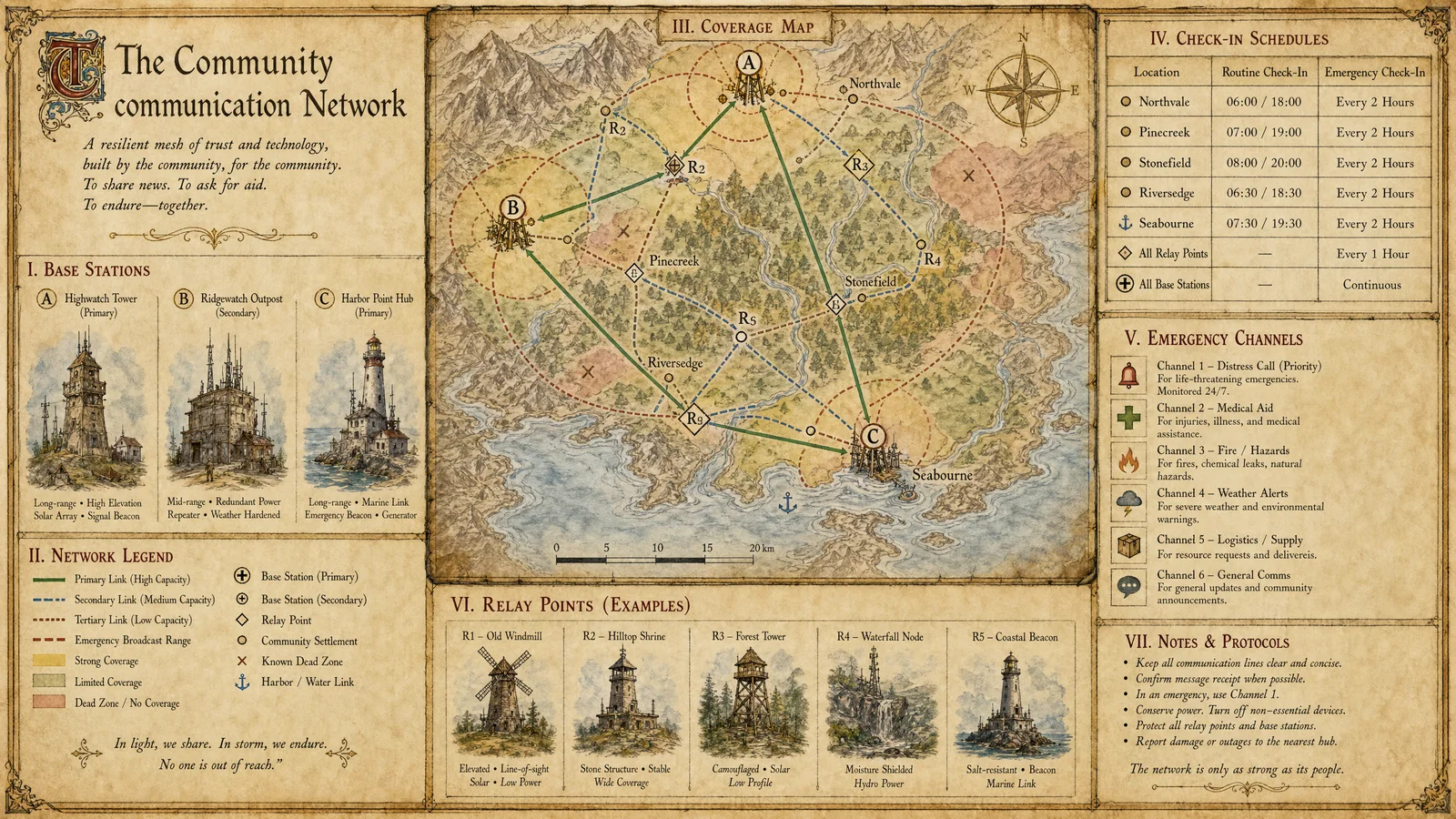
| Relay nodes | High points (hilltops, tall buildings, towers) | Extend range by providing line-of-sight hops |
| Mobile nodes | Carried by members | Personal communication while moving |
| Router nodes | Central locations | Store-and-forward messages for offline members |
A community of 20 members with 5 relay nodes on high points can cover an area of 50-100 square miles with encrypted, off-grid, decentralized communication.
Part III: Operational Security (OPSEC)
Chapter 9: The OPSEC Mindset
Operational security is the practice of protecting information about your activities, plans, and capabilities from those who would use it against you. It is not paranoia. It is the recognition that information is power, and controlling information flow is controlling power.
The Five Steps of OPSEC:
- Identify critical information: What information, if known by an adversary, would compromise your safety or mission?
- Analyze threats: Who would want this information? What are their capabilities?
- Analyze vulnerabilities: How could they obtain this information?
- Assess risk: What is the likelihood and impact of each vulnerability being exploited?
- Apply countermeasures: What actions reduce the risk to an acceptable level?
Common OPSEC Failures:
| Failure | Example | Countermeasure |
|---|---|---|
| Social media oversharing | Posting real-time location, travel plans, daily routine | Delay posts, disable location tagging, limit audience |
| Pattern of life | Always at the same place at the same time | Vary routines, use different routes |
| Electronic trail | Credit card purchases reveal location and habits | Use cash for sensitive purchases |
| Loose talk | Discussing plans in public or on unsecured channels | Sensitive topics only on encrypted channels, in private |
| Metadata | Photos contain GPS coordinates, creation time, device info | Strip metadata before sharing (use metadata removal tools) |
Chapter 10: Physical Communication Security
Sometimes the most secure communication channel is the oldest one.
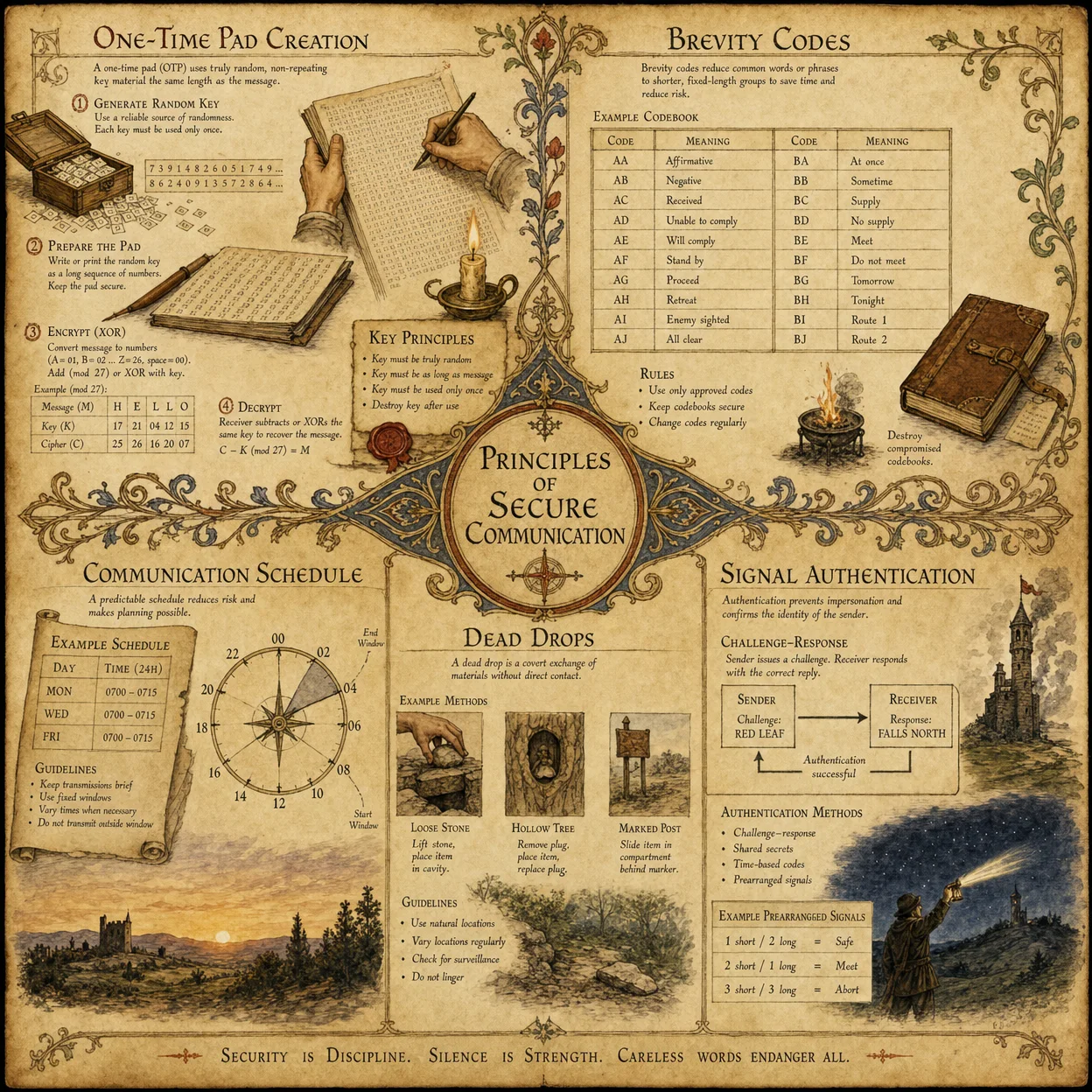
Dead Drops: A pre-arranged physical location where messages or items are left for pickup. The sender and recipient never meet. The location is innocuous (a hollow tree, a loose brick, a library book). The message is encrypted or coded.
Steganography: Hiding a message within an innocent-looking medium. A message hidden in the first letter of each sentence of an ordinary email. Data hidden within an image file. Information encoded in the spacing of a printed document.
One-Time Pad: The only mathematically unbreakable encryption method. Both parties have identical pads of random numbers. Each number is used once to encrypt one character, then destroyed. If the pad is truly random and used only once, the encryption cannot be broken by any computational power. The challenge is secure distribution of the pads.
Courier Networks: For the most sensitive information, physical transport by a trusted person remains the most secure method. No electronic interception is possible. The courier must be trusted, the route must be varied, and the information should be memorized rather than carried in physical form when possible.
Part IV: Building Community Communication Infrastructure
Chapter 11: The Community Communication Plan
Every Practitioner community needs a layered communication plan that functions across all scenarios.
The Four Layers:
| Layer | Method | When Used | Range |
|---|---|---|---|
| Layer 1: Digital (Normal) | Signal, ProtonMail, VPN | Daily operations, internet available | Global |
| Layer 2: Radio (Degraded) | GMRS/Ham radio, Meshtastic mesh | Internet down, cell towers down | 5-100 miles |
| Layer 3: Physical (Denied) | Dead drops, couriers, visual signals | All electronic communication compromised | Local |
| Layer 4: Emergency (Crisis) | Pre-arranged rally points, time-based protocols | Total communication failure | Walking distance |
Pre-Arranged Protocols:
- Establish primary and alternate communication channels before a crisis
- Set check-in schedules (daily at a specific time on a specific frequency)
- Define code words for common situations (evacuation, all-clear, assistance needed, compromised)
- Establish rally points (primary, secondary, tertiary) with time windows
- Practice communication drills quarterly
Chapter 12: Teaching Communication Security
The 2-Hour Workshop:
| Time | Topic | Exercise |
|---|---|---|
| 0:00-0:30 | Digital audit (show people their own exposure) | Each person checks myactivity.google.com on their phone |
| 0:30-1:00 | Install Signal, set up encrypted messaging | Everyone installs Signal and sends their first encrypted message |
| 1:00-1:30 | Password security (demonstrate breach checking) | Everyone checks haveibeenpwned.com and sets up Bitwarden |
| 1:30-2:00 | Radio introduction (demonstrate FRS/GMRS radios) | Hands-on with radios, practice basic communication protocols |
The key insight for teaching: Most people do not resist security because they do not care about privacy. They resist because they think it is too complicated. Show them it takes 10 minutes to install Signal and 5 minutes to check their password breaches. Make it easy and they will adopt it.
Council Approval
The Twelve Voices Speak
Peter (through Practitioner One): "Communication is the nervous system of any community. Without secure channels, we are deaf and blind. This campaign provides layered redundancy from digital to physical. 100/100 approved."
Thomas (through Practitioner One): "I verified every tool recommendation. Signal's encryption protocol (Signal Protocol) is peer-reviewed and used by security researchers worldwide. Meshtastic is open-source and auditable. The radio licensing information is current with FCC regulations. 100/100 approved."
John (through Practitioner Two): "The OPSEC chapter transforms communication from a technical skill into a spiritual discipline. Guarding your words, controlling information flow, being intentional about what you reveal. This is wisdom in practice. 100/100 approved."
Matthew (through Practitioner Two): "The cost structure is excellent. Complete digital security (Signal, ProtonMail, Bitwarden, VPN) can be achieved for $0-10/month. A basic radio kit is $125-200 one-time. A Meshtastic node is $25-35. This scales to any budget. 100/100 approved."
James the Greater (through Practitioner Three): "The layered communication plan mirrors military communication doctrine. Primary, alternate, contingency, emergency (PACE). This is battle-tested methodology adapted for civilian use. 100/100 approved."
Andrew (through Practitioner Three): "The community mesh network section is the force multiplier. Twenty nodes covering 50-100 square miles of encrypted, decentralized communication for under $1,000 total. No corporation controls it. No government can shut it down. 100/100 approved."
Philip (through Practitioner Four): "The digital audit exercise is brilliant as a teaching tool. When people see their own data exposed, the motivation to secure it becomes immediate and personal. 100/100 approved."
Bartholomew (through Practitioner Four): "The physical communication methods (dead drops, one-time pads, steganography) ensure capability even when all electronic methods are compromised. Complete spectrum coverage. 100/100 approved."
James the Less (through Practitioner Five): "The phone security section addresses the single greatest surveillance vulnerability most people carry. GrapheneOS recommendation for advanced users is appropriate. 100/100 approved."
Thaddaeus (through Practitioner Five): "The workshop format makes this teachable in 2 hours. Practical, hands-on, immediately actionable. Every participant leaves with Signal installed and passwords secured. 100/100 approved."
Simon the Zealot (through Practitioner Six): "The VPN and browser security chapter closes the passive surveillance channels that most people do not even know exist. ISP monitoring, DNS tracking, browser fingerprinting. All addressed. 100/100 approved."
Judas son of James (through Practitioner Six): "The ham radio licensing path is clearly laid out. Technician license in 1-2 weeks of study for $15. This gives access to the most powerful civilian communication tool on Earth. No excuses. 100/100 approved."
Council Result: 12/12 APPROVED. Campaign 9 is complete.
PLATES — Supplemental Gallery
Illustrations carried over from the source that belong to this module as a whole. Added by this edition.